
J1939 PGN Calculator & Decoder
Free online tool to decode and convert PGNs for SAE J1939® CAN identifiers. Enter a PGN in decimal or hex, or paste a full 29-bit CAN ID, and see the priority, data page, PDU format, PDU specific, source address, and computed PGN. To decode the signal values inside a message, load your own DBC or reference file — the tool decodes against your definitions and ships no built-in J1939 database.
What the PGN Calculator Does
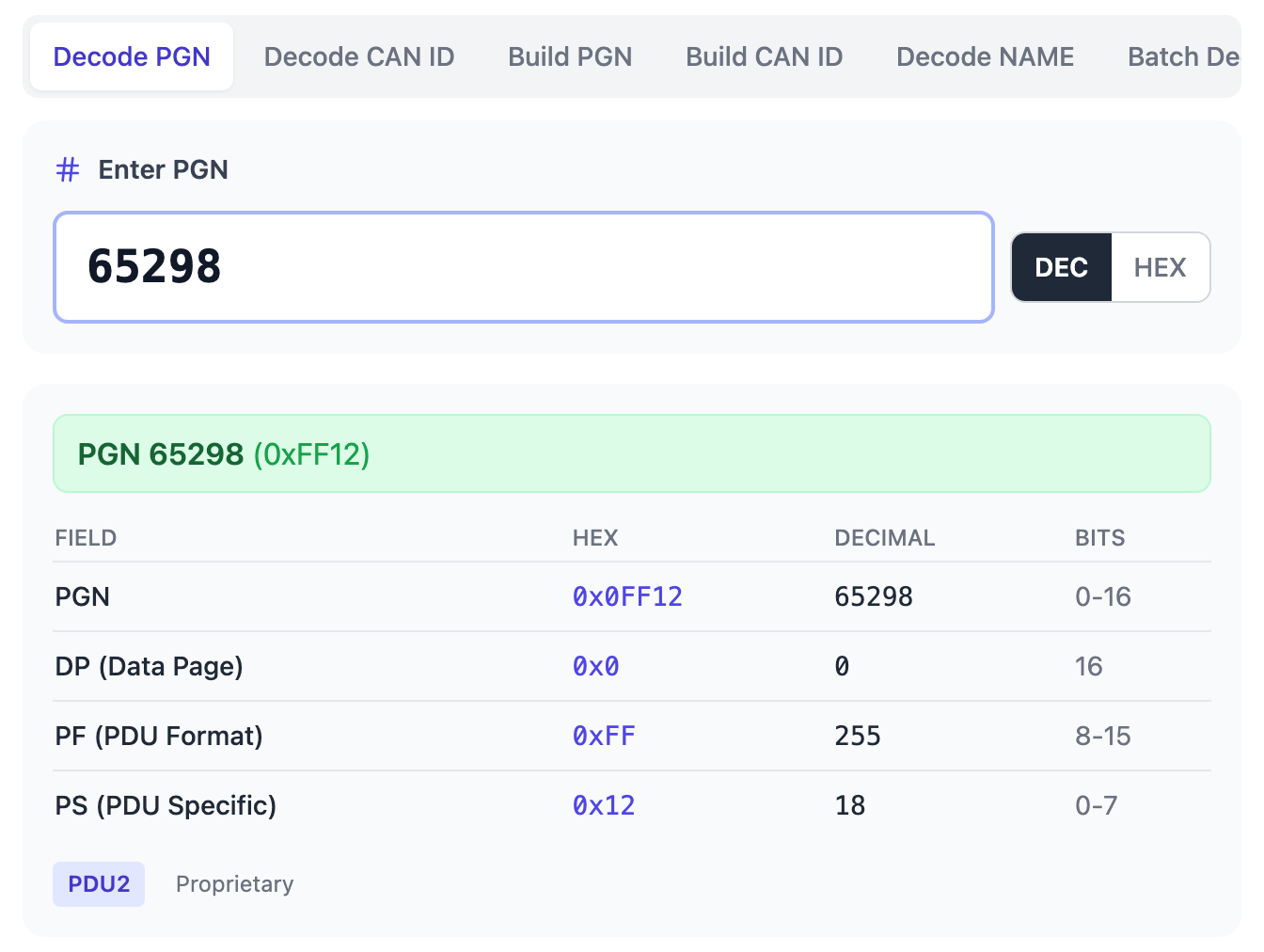
Enter a PGN number and get the full breakdown: data page, PDU format (PF), PDU specific (PS), and PDU1 vs PDU2 classification. With a DBC loaded, any matching names come from your own definitions.
Paste a 29-bit CAN ID in hex (e.g. 0x18FF1200) and extract the embedded PGN number, priority, source address, and destination. Handles both PDU1 (peer-to-peer) and PDU2 (broadcast) frames automatically.
Set priority, PGN, and source address to construct the full 29-bit extended CAN ID. Useful when configuring transmit messages in ECU software or CAN bus analyzers.
Search and inspect J1939 messages and SPNs from the DBC or reference file you provide. Import your own DBC or licensed reference file and the tool decodes signal values, bit positions, scaling, units, and ranges against it. No built-in signal database is bundled.
Paste multiple CAN IDs from a log file or trace capture and decode them all at once. Identify which J1939 PGNs are on the bus without decoding one by one.
Runs entirely in your browser. No downloads, no license keys, no Java runtime — open a tab and get started. Works on desktop, tablet, and mobile.
How J1939 PGN Decoding Works
In SAE J1939, every CAN message uses a 29-bit extended identifier. Unlike standard 11-bit CAN, the J1939 identifier encodes structured information about the message content, its priority, and the sending ECU.
29-Bit CAN ID Structure
The 29-bit identifier is divided into fields:
| Field | Bits | Description |
|---|---|---|
| Priority | 3 | Message priority (0 = highest, 7 = lowest). |
| Reserved | 1 | Reserved bit, always 0 in J1939. |
| Data Page (DP) | 1 | Selects between page 0 (standard J1939) and page 1 (extended). |
| PDU Format (PF) | 8 | Determines the message type. PF < 240 = PDU1 (peer-to-peer), PF ≥ 240 = PDU2 (broadcast). |
| PDU Specific (PS) | 8 | In PDU1: destination address. In PDU2: group extension (part of the PGN). |
| Source Address (SA) | 8 | Address of the ECU transmitting the message (0–253). |
PGN Extraction from a CAN ID
The Parameter Group Number (PGN) is computed from the identifier, and how depends on the PDU type:
- PDU2 (PF ≥ 240): the PS field is a group extension, so it is part of the PGN. Example: CAN ID
0x18FF1200has PF = 0xFF, so PGN = (DP × 65536) + (PF × 256) + PS = 65298 — a broadcast message. - PDU1 (PF < 240): PS is the destination address, not part of the PGN. Example: CAN ID
0x0C213425has PF = 0x21, so PGN = (DP × 65536) + (PF × 256) = 8448, addressed to destination 0x34.
CAN ID to PGN Calculator
Paste a 29-bit CAN ID and the calculator extracts the priority, data page, PDU format, PDU specific, source address, PDU class, and computed PGN. For PDU2 messages, the PS byte is part of the PGN; for PDU1 messages, PS is the destination address.
Looking for a J1939 PGN or SPN list?
The official PGN and SPN definitions are maintained in the SAE J1939 Digital Annex. This page does not include or redistribute that database. The calculator computes PGNs from CAN identifiers and can decode signal definitions from a DBC or reference file you provide.
Proprietary PGNs: manufacturer-defined messages
Not every J1939 message is defined by the standard. J1939 reserves ranges for
proprietary, manufacturer-specific data, so engine makers,
transmission suppliers, and equipment or implement manufacturers can carry whatever
the standard doesn’t cover — for example a battery-management system
(BMS), an implement controller, or a vendor-specific sensor.
- Proprietary A — PGN
61184(0xEF00): a peer-to-peer proprietary message (the PS byte is the destination address). - Proprietary B — PGNs
65280–65535(0xFF00–0xFFFF): 256 broadcast proprietary messages.
Proprietary messages have no public definitions. Their bit
positions, scaling, offsets, and meaning are decided by the manufacturer and shipped
in that manufacturer’s DBC or reference file — there is no central registry
to look them up in. To decode one, load the manufacturer’s DBC into the
calculator and it decodes against those definitions.
Proprietary PGN examples (illustrative)
| PGN (hex / dec) | Range | Fictional use |
|---|---|---|
0xFF10 / 65296 | Proprietary B | Acme Inc — battery pack status |
0xFF20 / 65312 | Proprietary B | Acme Inc — implement hitch |
0xFF31 / 65329 | Proprietary B | Acme Inc — auxiliary hydraulics |
0xEF00 / 61184 | Proprietary A | Acme Inc — service-tool session |
Payload layout is manufacturer-defined and requires the manufacturer’s DBC or reference file.
Illustrative only. “Acme Inc” is
fictional and these PGN assignments are invented to show the shape of proprietary data
— they are not real definitions. Proprietary PGNs carry no public registry; decode
them with the manufacturer’s own DBC.
Decoding signal values: bring your own DBC
The calculator decodes the structure of any J1939 message for free — priority, DP, PF, PS, source address, and the computed PGN number — with no reference data required. To decode the signal values inside the payload (the SPNs — their bit positions, scale factors, offsets, and units), load your own DBC file or reference file. The tool decodes against the definitions you supply; with nothing loaded it reports the raw decoded fields only.
Why signal definitions need an authorized source
The authoritative J1939 parameter set — the full list of PGN and SPN definitions — lives in the SAE J1939 Digital Annex, which is maintained and licensed by SAE International. If you need the official definitions, license the Digital Annex from SAE, or use a DBC file you already own. Load that file into the calculator and it decodes your traffic against those definitions, entirely in your browser.
DBC-Based SPN Decode
Each PGN carries one or more Suspect Parameter Numbers (SPNs). An SPN is a single signal within the 8-byte payload, defined by its bit position, length, scaling factor, offset, unit, and valid range.
The calculator does not ship those definitions. The bit positions and scale factors that turn raw bytes into engineering values come from a DBC or reference file you load, or from the licensed SAE J1939 Digital Annex. Load your file and the tool searches and decodes SPNs against your definitions; with no file loaded it reports the raw decoded fields only.
Frequently Asked Questions
What is a J1939 PGN?
A Parameter Group Number (PGN) is a unique identifier in the SAE J1939 protocol that defines a group of related parameters — for example, a group of engine or transmission signals. PGNs range from 0 to 131,071 and are embedded within the 29-bit CAN identifier.
How do I convert a CAN ID to a PGN?
Extract bits 8–25 of the 29-bit CAN identifier. If the PDU Format (PF) field is 240 or higher (PDU2), the PGN includes the PDU Specific (PS) byte as a group extension. If PF is below 240 (PDU1), the PS byte is the destination address and is NOT part of the PGN. Our CAN ID to PGN converter handles this automatically.
What is the difference between PDU1 and PDU2?
PDU1 (PF < 240) messages are peer-to-peer — the PS field specifies which ECU the message is addressed to (or 0xFF for global broadcast). PDU2 (PF ≥ 240) messages are always broadcast, and the PS field extends the PGN number. Most common broadcast J1939 messages are PDU2.
What is a J1939 SPN?
A Suspect Parameter Number (SPN) identifies a single data signal within a PGN’s 8-byte payload. Each SPN defines a bit position, length, resolution, offset, and unit — and those definitions come from a DBC or the licensed SAE Digital Annex, not from this tool. SPNs are also used in Diagnostic Trouble Codes (DTCs) alongside a Failure Mode Identifier (FMI).
What is a proprietary J1939 PGN?
A proprietary PGN is a manufacturer-defined message carried in the J1939 reserved proprietary ranges — Proprietary A (PGN 61184 / 0xEF00, peer-to-peer) and Proprietary B (PGNs 65280–65535 / 0xFF00–0xFFFF, broadcast). OEMs and suppliers use them for data the standard does not define, such as battery-management or implement controls. They have no public definitions; you decode them with a DBC supplied by the manufacturer.
Do you have the full J1939 PGN/SPN database?
No. The complete SAE J1939 specification — including the Digital Annex with the full set of PGN and SPN definitions — is maintained and licensed by SAE International. Our calculator ships no built-in PGN/SPN/FMI database; it decodes against a DBC or reference file you upload, so you work with your own (or your licensed) definitions, entirely in your browser.
Is this PGN calculator free?
Yes — decoding is free; create a free account (no credit card) to view the PGN and CAN ID field breakdown. Pro features include batch decoding from log files, DBC/reference file support, and building CAN IDs from custom fields.
Start Decoding J1939 PGNs
No download — it runs in your browser. Create a free account, paste a PGN or CAN ID, and view the full field breakdown.
Need to understand J1939 at a deeper level? Our CAN Troubleshooting course covers J1939 protocol analysis, PGN/SPN interpretation, and real-world diagnostic techniques.
SAE® and J1939® are registered trademarks of SAE International. CANbus Academy is not affiliated with, sponsored by, endorsed by, or authorized by SAE International. This page explains the J1939 protocol structure for education; it does not provide, reproduce, or replace the SAE J1939DA database, ISO 11783 registry tables, or any built-in PGN/SPN/FMI database. The calculator decodes signal definitions only from files you supply.