
J1939 PGN Calculator & Decoder
Free online tool to decode, convert, and look up J1939 Parameter Group Numbers. Enter a PGN in decimal or hex, or paste a full 29-bit CAN ID, and instantly see the priority, data page, PDU format, PDU specific, source address, and all associated SPN definitions.
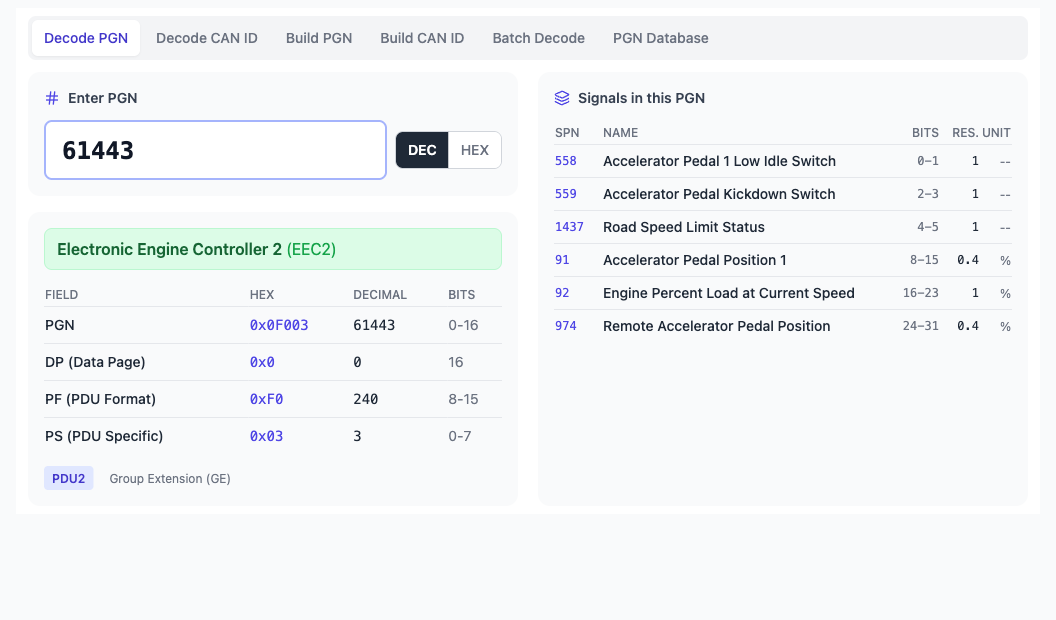
What the PGN Calculator Does
Enter a PGN number (e.g. 61444) and get the full breakdown: data page, PDU format (PF), PDU specific (PS), PDU1 vs PDU2 classification, and the parameter group name and acronym from the J1939 database.
Paste a 29-bit CAN ID in hex (e.g. 0x0CF00400) and extract the embedded PGN, priority, source address, and destination. Handles both PDU1 (peer-to-peer) and PDU2 (broadcast) frames automatically.
Set priority, PGN, and source address to construct the full 29-bit extended CAN ID. Useful when configuring transmit messages in ECU software or CAN bus analyzers.
Browse the searchable PGN database with parameter group definitions, transmission rates, and data lengths. Each PGN links to its SPN list with scaling factors, bit positions, units, and valid ranges.
Paste multiple CAN IDs from a log file or trace capture and decode them all at once. Identify which J1939 PGNs are on the bus without decoding one by one.
Runs entirely in your browser. No downloads, no license keys, no Java runtime — open a tab and start decoding. Works on desktop, tablet, and mobile.
How J1939 PGN Decoding Works
In SAE J1939, every CAN message uses a 29-bit extended identifier. Unlike standard 11-bit CAN, the J1939 identifier encodes structured information about the message content, its priority, and the sending ECU.
29-Bit CAN ID Structure
The 29-bit identifier is divided into fields:
| Field | Bits | Description |
|---|---|---|
| Priority | 3 | Message priority (0 = highest, 7 = lowest). Engine control messages typically use priority 3. |
| Reserved | 1 | Reserved bit, always 0 in J1939. |
| Data Page (DP) | 1 | Selects between page 0 (standard J1939) and page 1 (extended). |
| PDU Format (PF) | 8 | Determines the message type. PF < 240 = PDU1 (peer-to-peer), PF ≥ 240 = PDU2 (broadcast). |
| PDU Specific (PS) | 8 | In PDU1: destination address. In PDU2: group extension (part of the PGN). |
| Source Address (SA) | 8 | Address of the ECU transmitting the message (0–253). |
PGN Extraction from a CAN ID
The Parameter Group Number (PGN) is extracted differently depending on the PDU type:
- PDU2 (PF ≥ 240): PGN = DP + PF + PS — the PS field is a group extension, so it’s part of the PGN. Example: CAN ID
0x18FEF200→ PGN 65266 (FMS/Fuel Economy). - PDU1 (PF < 240): PGN = DP + PF only — PS is the destination address, not part of the PGN. Example: CAN ID
0x0CF00400→ PGN 61444 (EEC1), destination = global (broadcast).
Common J1939 PGNs
| PGN | Acronym | Name | Key SPNs |
|---|---|---|---|
| 61444 | EEC1 | Electronic Engine Controller 1 | Engine Speed (190), Engine Torque (513) |
| 61443 | EEC2 | Electronic Engine Controller 2 | Accelerator Pedal Position (91), Engine Load (92) |
| 65262 | ET1 | Engine Temperature 1 | Engine Coolant Temp (110), Fuel Temp (174) |
| 65263 | EFL/P1 | Engine Fluid Level/Pressure 1 | Oil Pressure (100), Coolant Level (111) |
| 65265 | CCVS | Cruise Control/Vehicle Speed | Wheel-Based Vehicle Speed (84) |
| 65266 | LFE | Fuel Economy (Liquid) | Fuel Rate (183), Instant Fuel Economy (184) |
| 65269 | AMB | Ambient Conditions | Barometric Pressure (108), Ambient Air Temp (171) |
| 65270 | IC1 | Inlet/Exhaust Conditions 1 | Boost Pressure (102), Intake Temp (105) |
| 65271 | VEP1 | Vehicle Electrical Power 1 | Battery Voltage (168), Alternator Current (114) |
| 65279 | DM1 | Active Diagnostic Trouble Codes | SPN + FMI + OC (fault codes) |
J1939 SPN List & Lookup
Each PGN contains one or more Suspect Parameter Numbers (SPNs). An SPN defines a single signal within the 8-byte data payload — its bit position, length, scaling factor, offset, unit, and valid range.
For example, PGN 61444 (EEC1) contains SPN 190 (Engine Speed) at bytes 4–5 with a resolution of 0.125 RPM/bit, giving a range of 0–8,031.875 RPM.
The PGN Calculator shows every SPN for each decoded PGN, making it a complete J1939 SPN reference that you can search by PGN number, name, or SPN number.
Frequently Asked Questions
What is a J1939 PGN?
A Parameter Group Number (PGN) is a unique identifier in the SAE J1939 protocol that defines a group of related parameters. For example, PGN 61444 is “Electronic Engine Controller 1” and contains engine speed, torque, and starter mode. PGNs range from 0 to 131,071 and are embedded within the 29-bit CAN identifier.
How do I convert a CAN ID to a PGN?
Extract bits 8–25 of the 29-bit CAN identifier. If the PDU Format (PF) field is 240 or higher (PDU2), the PGN includes the PDU Specific (PS) byte as a group extension. If PF is below 240 (PDU1), the PS byte is the destination address and is NOT part of the PGN. Our CAN ID to PGN converter handles this automatically.
What is the difference between PDU1 and PDU2?
PDU1 (PF < 240) messages are peer-to-peer — the PS field specifies which ECU the message is addressed to (or 0xFF for global broadcast). PDU2 (PF ≥ 240) messages are always broadcast, and the PS field extends the PGN number. Most common J1939 messages (EEC1, CCVS, temperatures) are PDU2.
What is a J1939 SPN?
A Suspect Parameter Number (SPN) identifies a single data signal within a PGN’s 8-byte payload. Each SPN defines the bit position, length, resolution, offset, and unit. For example, SPN 190 is “Engine Speed” with 0.125 RPM/bit resolution. SPNs are also used in Diagnostic Trouble Codes (DTCs) alongside a Failure Mode Identifier (FMI).
Is this PGN calculator free?
Yes. PGN decoding, CAN ID conversion, and PGN lookup are free with no account required. Pro features include batch decoding from log files, the full searchable PGN database, and building CAN IDs from custom fields.
Start Decoding J1939 PGNs
No download. No signup required for basic decoding. Open the calculator and paste a PGN or CAN ID.
Need to understand J1939 at a deeper level? Our CAN Troubleshooting course covers J1939 protocol analysis, PGN/SPN interpretation, and real-world diagnostic techniques.